Block Bindings
Casey J. Milne
With the release of WordPress version 6.9 the Block Bindings API has been provided significant upgrades. Most notably there is now a UI for attaching dynamic data to blocks.
Users can now make bound blocks and save them into patterns for reuse.
Notice in the screenshot below that we have a paragraph block selected and in the block settings tab there is an attributes panel that appears.
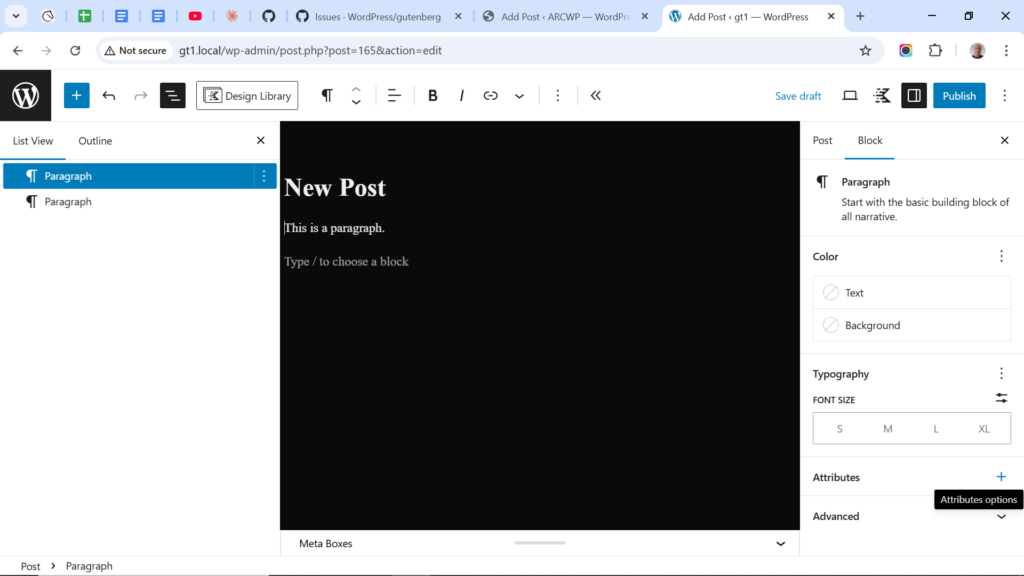
There are several conditions that have to be met for the Attributes Panel to appear in the Block Settings, which include:
- Block must support block bindings. Currently 7 core block types do. For 3rd party block libraries check with the maker if they have added block bindings support in their block types.
- There must be at least one data source available. If you register post meta using ACF/Metaboxes or code, this will trigger the core/post-meta data source so long as the meta fields are set to “Show in REST”.
